
KuCoin API Key Setup
Create a KuCoin API key with trading permissions for automated trading.
Before You Start
- A verified KuCoin account
- Google 2FA enabled
- Trading Password set up in account settings
Setup Steps
1
Navigate to API Management
Hover over your profile icon in the top-right corner of the KuCoin dashboard. Select "API Management" from the menu.

2
Create API Key
In the API Management page, click "Create API" to start the API key creation process.

3
Configure API Key Settings
Fill in the following:
- **Name**: Enter a label (e.g., "10Quant")
- **Passphrase**: Create a strong passphrase — remember this, you will need it in 10Quant
- **Permissions**: Enable the following:
✅ Futures Trading (specifically check this — "General" is read-only)
✅ Read
❌ DO NOT enable Withdraw
Leave the IP restriction blank unless you have a static IP.
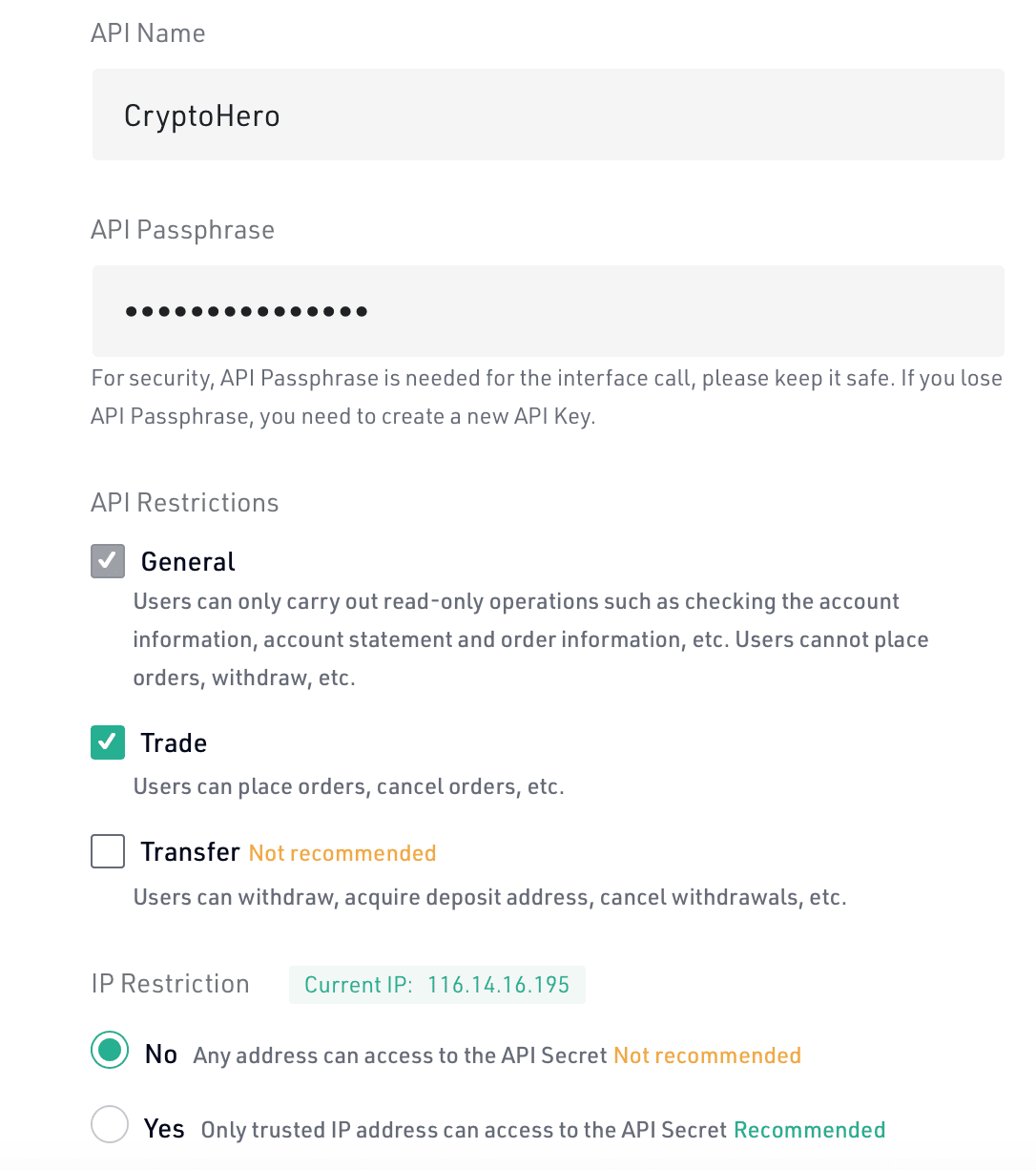
The "General" permission is read-only and does NOT allow trading. You must specifically check "Futures Trading" to enable automated trading. Do NOT grant Withdraw permission.
4
Complete Verification
Complete the security verification using Google Authenticator code, email verification, and Trading Password as prompted.
5
Copy Your API Keys
After verification, copy all three values:
- **API Key** (Access Key)
- **Secret Key** (Secret Key)
- **Passphrase** (the one you created in Step 3)
The Secret Key will only be shown once. The Passphrase is required for every API request.
6
Add API Key to 10Quant
Go to the 10Quant platform and navigate to Settings > Exchange API. Click "Add Key", select KuCoin as the exchange, then paste the API Key, Secret Key, and Passphrase. Click "Verify" to confirm the connection is working.
Important Warnings
- Never grant Withdraw permission.
- KuCoin requires a Passphrase — it is part of the API authentication signature.
- Both Trading Password and Passphrase are required — they serve different purposes.
- "General" permission is read-only. You must select "Futures Trading" specifically.
Helpful Tips
- The KuCoin API uses API Key + Secret Key + Passphrase for authentication. All three are required.
- You can set up multiple API keys with different permission levels.